ChatMapper Cloud is open. Your dialogue tool now runs in the browser.
The branching dialogue editor you already know, now in the browser. Import the .cmp projects you have, walk the quest with real variables, catch the broken branch before your writers do, and export to Unity or Yarn.
ChatMapper Cloud is the same branching conversation tool, running in a browser instead of on one Windows machine. It opens the .cmp files you already have, keeps the structure, adds real simulation, deterministic validation and team access, and exports to JSON, Unity, Yarn, SCORM, xAPI and LearnBrite. Until 31 August 2026, founding pricing is locked for as long as you stay subscribed.
Under a minute, one real conversation.
The example project that lands in your workspace on the first login: mapped, given conditions, played with its own art, validated and exported to your engine. Every frame is the application.
Import, map, write, play, validate, ship to Unity or Yarn. No edits to the project were needed to make it run.
Everything Desktop did, plus the parts it never could.
Desktop 1.9.1 is still there and still free for personal use. This is what moving to the browser actually buys you.
| Capability | ChatMapper Cloud | ChatMapper Desktop 1.9.1 |
|---|---|---|
| Opens your existing .cmp projects | ✓ | ✓ |
| Runs on macOS and Linux | ✓ | ✕ Windows only |
| Deterministic validation of every path | ✓ | ✕ |
| Team access, roles and revision history | ✓ | ✕ file passing |
| AI copilot, propose then approve | ✓ | ✕ |
| Unity, Yarn, SCORM, xAPI export | ✓ | Partial |
| Immersive 3D and avatar delivery | ✓ via LearnBrite | ✕ |
| Works with no internet connection | Enterprise on-prem | ✓ |
| Actively developed | ✓ | Maintenance only |
Desktop capabilities reflect release 1.9.1. Cloud capabilities reflect the current release.
Nothing you already built is stranded.
Import is not a conversion you have to check line by line. The project opens with its conversations, nodes, links, actors, variables and Lua intact.
Open the file you have
.cmp, .cmpkg, XML and JSON all import directly, along with articy:draft, Arcweave and Twine projects if you have moved between tools.
Check it in the simulator
Play the conversation through before you change anything. Variables and conditions run for real, so you can confirm the import matched what Desktop did.
Let validation find the rest
Unreachable nodes, broken links and dead conditions are reported as a list you can click through, including problems that were always there and never surfaced.
Export back out at any time
Canonical JSON means you are never holding a file only one tool can read. Nothing about moving in stops you moving on.
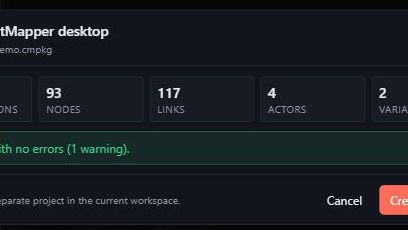
A real Desktop package from 2015, previewed before anything is written: 93 nodes, 117 links, no errors.
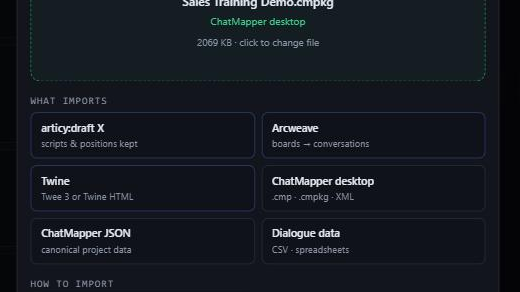
Drop the file in and the format is detected. articy:draft, Arcweave, Twine and spreadsheets land the same way.
Six screens, start to finish.
Not mockups. This is a real ChatMapper Desktop project, imported and then worked on in the browser.
104,000+ creators have built branching conversations with ChatMapper
Used by teams at
Locked for as long as you stay subscribed.
Founding pricing is available until 31 August 2026. Apply your code by then and you keep the founding rate for as long as the subscription stays active. It does not step up at renewal.
Founding Creator
Normally $228 a year. You save $79 every year you stay.
Code CMFOUNDINGCREATOR is applied for you, and shown at checkout if you need to enter it.
- One editor, unlimited projects and nodes
- Full export: Unity, Yarn, SCORM, xAPI, LearnBrite
- AI copilot: propose, review, approve
- Migration help for your existing .cmp projects
- A direct feedback channel into the product
Founding Team and Studio
Three editors. Normally $948 a year. You save $258 every year you stay.
Code CMFOUNDINGTEAM is applied for you, and shown at checkout if you need to enter it.
- Everything in Creator, for three editors
- Organizations, teams and role based access
- Live presence and conflict protection
- Full history: diff and restore
- Shared AI provider config and priority support
Enterprise and OEM
For a back catalogue to move across, or the engine embedded in your own product.
- Everything in Team and Studio
- Hands on migration for many projects at once
- OEM and white label scenario engine
- SSO, security review and DPA
- Onboarding, SLA and commercial support
Prices are in USD and billed annually. Desktop 1.9.1 stays free for personal use and is unaffected by this offer. Cancel from your account at any time.
The questions people actually ask
What happens to the projects I already made in Desktop?
They import. ChatMapper Cloud opens .cmp, .cmpkg, XML and JSON directly, keeping conversations, nodes, links, actors, variables and Lua. Play the project in the simulator straight after importing to confirm it behaves the way it did on Desktop.
Do I still need Windows?
No. Cloud runs in any modern browser, so macOS and Linux work exactly the same. Desktop 1.9.1 remains Windows only and remains available.
Can I use it for commercial and client work?
Yes. Every paid Cloud plan permits commercial and client work. The free tier permits commercial use as well, within its project and node limits.
Do I have to use the AI features?
No. The entire authoring workflow works without AI. The copilot runs on your own provider keys, billed by that provider with no markup, and it proposes changes for you to approve rather than editing your project on its own.
What does “locked while subscribed” actually mean?
The founding rate applies for as long as the subscription stays active. It does not increase at renewal. If you cancel and come back later, you return at the standard price of the day.
Can I cancel?
Yes, from your account, at any time. You keep access until the end of the period you have paid for, and canonical JSON export means your work leaves with you.
What happens after 31 August 2026?
The founding rate stops being offered to new subscribers. Anyone already on it keeps it. Nothing about the product changes on that date.
Founding pricing closes 31 August 2026.
Open the example project, import something you already made, and decide from there. Starting costs nothing.